

Asset inspection software should help you understand an asset’s recorded condition, not just confirm that an inspection took place. The difference is how it stores findings: inside separate form submissions, or against the specific asset and checkpoint being inspected.
A completed form records a visit. An asset-linked inspection history helps you see what was found, what changed and which defects still need attention.
That distinction matters when a maintenance manager asks whether a vehicle’s brakes have deteriorated, or an auditor asks for the evidence behind an inspection record. Finding a completed checklist is not the same as answering either question.
What is asset-centric inspection software?
Asset-centric inspection software organizes inspection findings around individual assets and their checkpoints. Each inspection adds to the asset’s history, connecting observed condition, photographs, dates and inspectors to the item being inspected.
A checkpoint is a specific inspection item, such as a vehicle’s brakes, windscreen or fire extinguisher. Recording findings against consistent checkpoints makes it easier to compare the same item across successive inspections.
The form still matters. It guides the technician through the inspection. But it is the capture tool, not the whole asset record.
Where do standalone inspection forms fall short?
Digital checklists are useful for collecting answers, photographs and signatures. The limitation appears when those findings remain isolated in separate submissions.
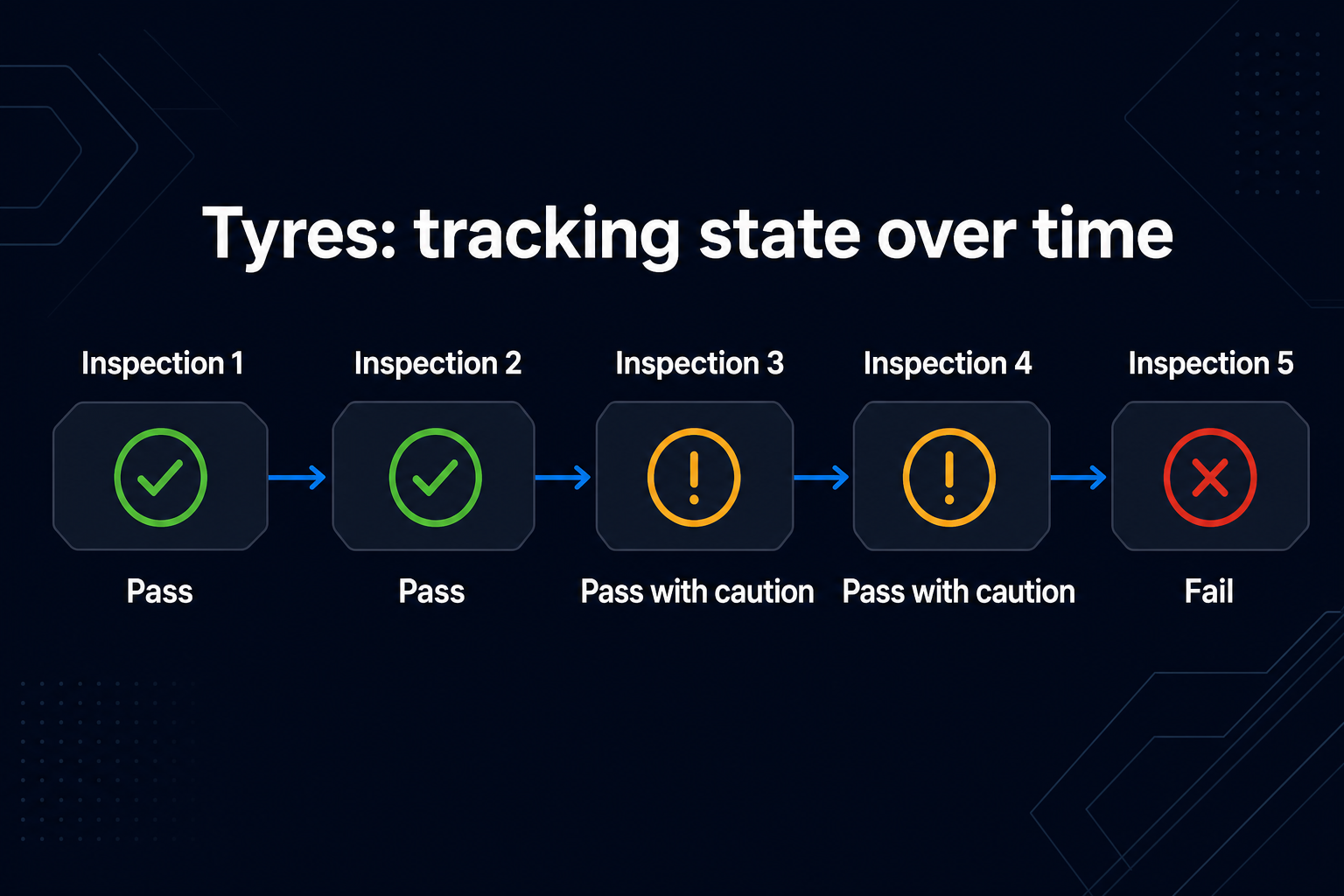
Consider a delivery vehicle inspected three times. Its windscreen passes on the first visit, receives a caution on the second and fails on the third.
If those findings live only in separate forms, someone must bring them together to understand the deterioration. If they are linked to the same windscreen checkpoint on the same vehicle, the sequence becomes part of that asset’s history.
- Inconsistent inspection items: “Brakes OK?” and “Brake condition” may be treated as unrelated fields when templates are built separately.
- Limited prioritization: A failed safety-critical item and a cosmetic defect can look equivalent if both are simply recorded as “No.”
- Disconnected follow-through: A defect remains in an earlier report without a clear connection to the asset’s current recorded status.
These are questions about configuration and data structure, not a claim that every form-based product has the same limitations. Ask the supplier to demonstrate the workflow on one asset.
How does AssetPool Nova connect inspections to assets?
In AssetPool Nova, checkpoints are linked to asset types. Assets of the same type inherit a common inspection definition, and findings are recorded against checkpoints on each asset.
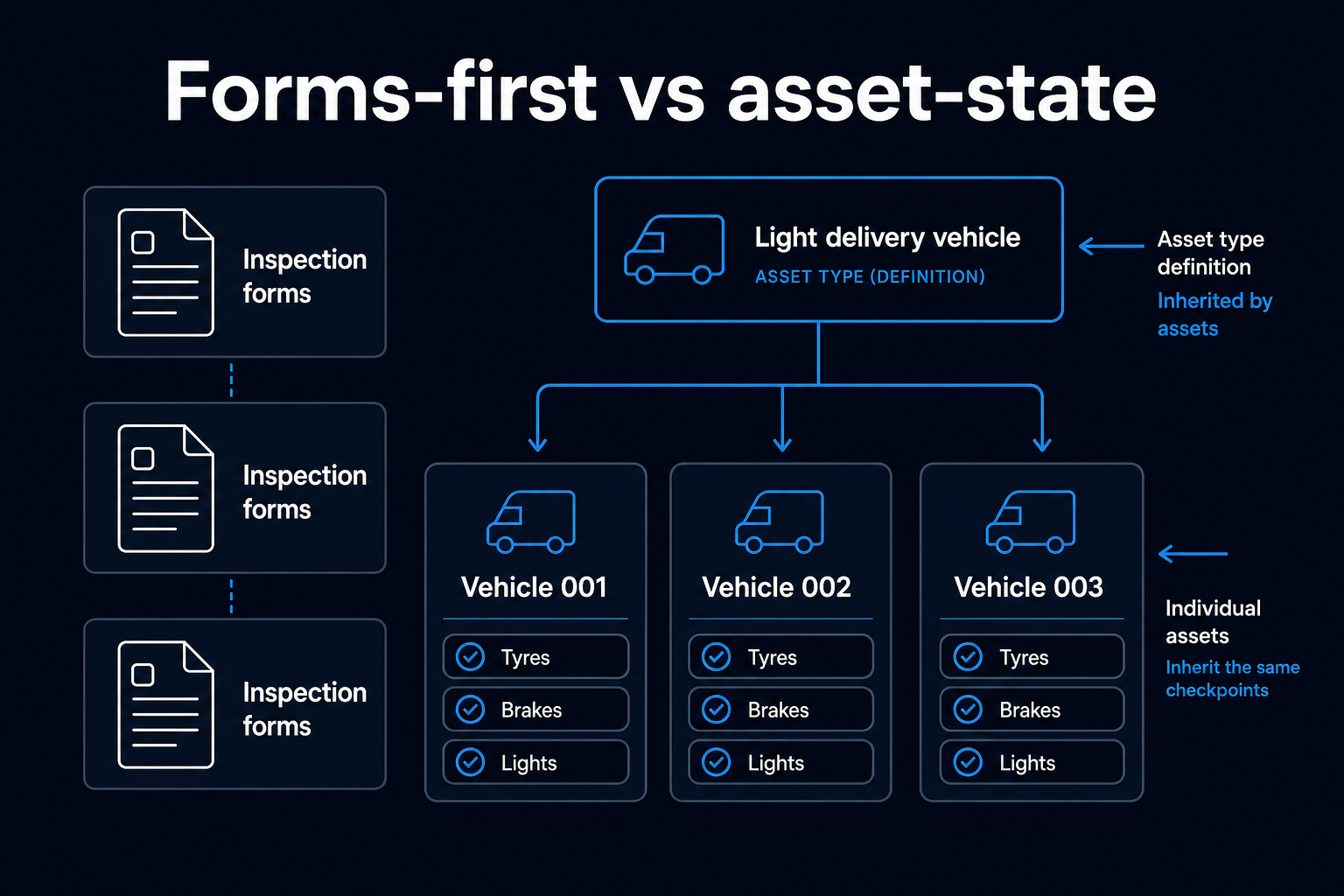
For a light delivery vehicle, the workflow looks like this:
- Define the asset type. Set up checkpoints such as tyres, brakes, lights and windscreen.
- Add the vehicles. Each vehicle of that type inherits the relevant checkpoints.
- Record the inspection. The technician records findings against that vehicle’s checkpoints, with supporting evidence.
- Review the asset history. Subsequent inspections build on the same checkpoint history rather than creating disconnected records.
This gives teams a consistent basis for comparison across vehicles, sites and inspection dates.
How do scored inspection outcomes support asset health?
Scored inspection outcomes turn individual findings into a calculated view of asset health. In Nova, outcomes such as pass, pass with caution and fail carry values, while checkpoint weightings reflect the relative importance of different findings.
A brake failure should not have the same influence as a scuffed panel. Weighting allows that distinction to be reflected in the health calculation.
The calculation should also be traceable. A manager reviewing a change in health needs to see the underlying checkpoint finding, inspection date, inspector and supporting photograph, rather than relying on an unexplained label.
An asset health score reflects recorded inspection findings. It does not establish that an asset is safe or describe changes that happened after its latest inspection.
What happens to a defect after an inspection?
A defect should remain connected to the affected asset until the relevant checkpoint is re-inspected and passes. Completing a different inspection or assigning a different technician should not, by itself, close the finding.
In Nova, failed checkpoints remain failed against the asset until a later inspection records that checkpoint as passing.
If a vehicle’s windscreen fails, a later inspection of its lights does not resolve the windscreen defect. The windscreen needs its own follow-up evidence.
That continuity matters across shift changes, maintenance handovers and repeat visits. The record follows the item, not just the person who found the problem.
How are asset health, condition, risk and compliance different?
These views answer different operational questions. They should not be collapsed into a single status.
- Health: What do the latest scored inspection findings indicate about the asset overall?
- Condition: What was observed at each checkpoint, and how has it changed between inspections?
- Risk: Which findings deserve priority, considering their significance and the operational context?
- Compliance: Was the required inspection completed on schedule, against the relevant requirements, with supporting evidence?
A vehicle may be physically functional while an inspection is overdue. Another may have a recent inspection but an unresolved defect. Keeping these dimensions separate helps teams distinguish inspection completion from asset condition.
Inspection records support compliance reviews. They do not, on their own, guarantee compliance or replace applicable maintenance, certification or regulatory requirements.
Can inspection history support preventive maintenance?
Consistent checkpoint histories can help maintenance teams identify deterioration and plan follow-up before a recorded concern becomes a failure.
Repeated tyre cautions across vehicles of the same type, for example, may warrant a closer review of replacement intervals or operating conditions.
This is different from claiming that inspection software can reliably predict every failure. Useful prediction depends on the quality, frequency and relevance of the available data. A structured history provides a basis for analysis; it is not a guarantee of what happens next.
What should you ask when comparing asset inspection software?
Ask a supplier to demonstrate these tasks using one asset, rather than showing only the checklist builder:
- Show the current and previous findings for the same checkpoint.
- Trace an asset health score back to its inspection evidence.
- Show how a failed checkpoint remains open and how it is resolved.
- Demonstrate how inspection definitions stay consistent across an asset type.
- Separate asset condition from inspection completion and compliance status.
The useful distinction is not whether the software has forms. It is whether those forms contribute to a consistent, traceable asset record.
Frequently asked questions
What is the difference between an inspection checklist and an asset record?
An inspection checklist guides data capture during a visit. An asset record brings together information about a specific asset across visits, including checkpoint findings, inspection dates, evidence and unresolved defects.
Can digital inspection forms track asset condition?
Yes, when their findings are linked to consistent assets and checkpoints. Digitizing a form alone does not establish that connection. Ask how the system compares the same inspection item over time.
Does a passed inspection mean an asset is compliant?
Not necessarily. A passed inspection records an outcome against the items inspected at that time. Compliance may also depend on inspection schedules, certification, applicable standards and other requirements.
What evidence should an asset inspection record include?
A useful record identifies the asset, checkpoint, finding, inspection date and inspector, with photographic evidence where relevant. Follow-up records should show how an identified defect was reviewed and resolved.
Start with one asset and its inspection history
Choose an asset with repeat inspections. Look at one checkpoint and ask: what was found last time, what is recorded now, and what evidence explains the change?
AssetPool Nova is built around that connection between assets, checkpoints and inspection findings. Set up one asset type and review how its inspection history supports your maintenance decisions.
Share:

.png?width=393&height=200&name=blog%20image%20(2).png)
.png?width=393&height=200&name=blog%20image%20(3).png)